UK sole trader spreadsheet, grouped by SA103 box
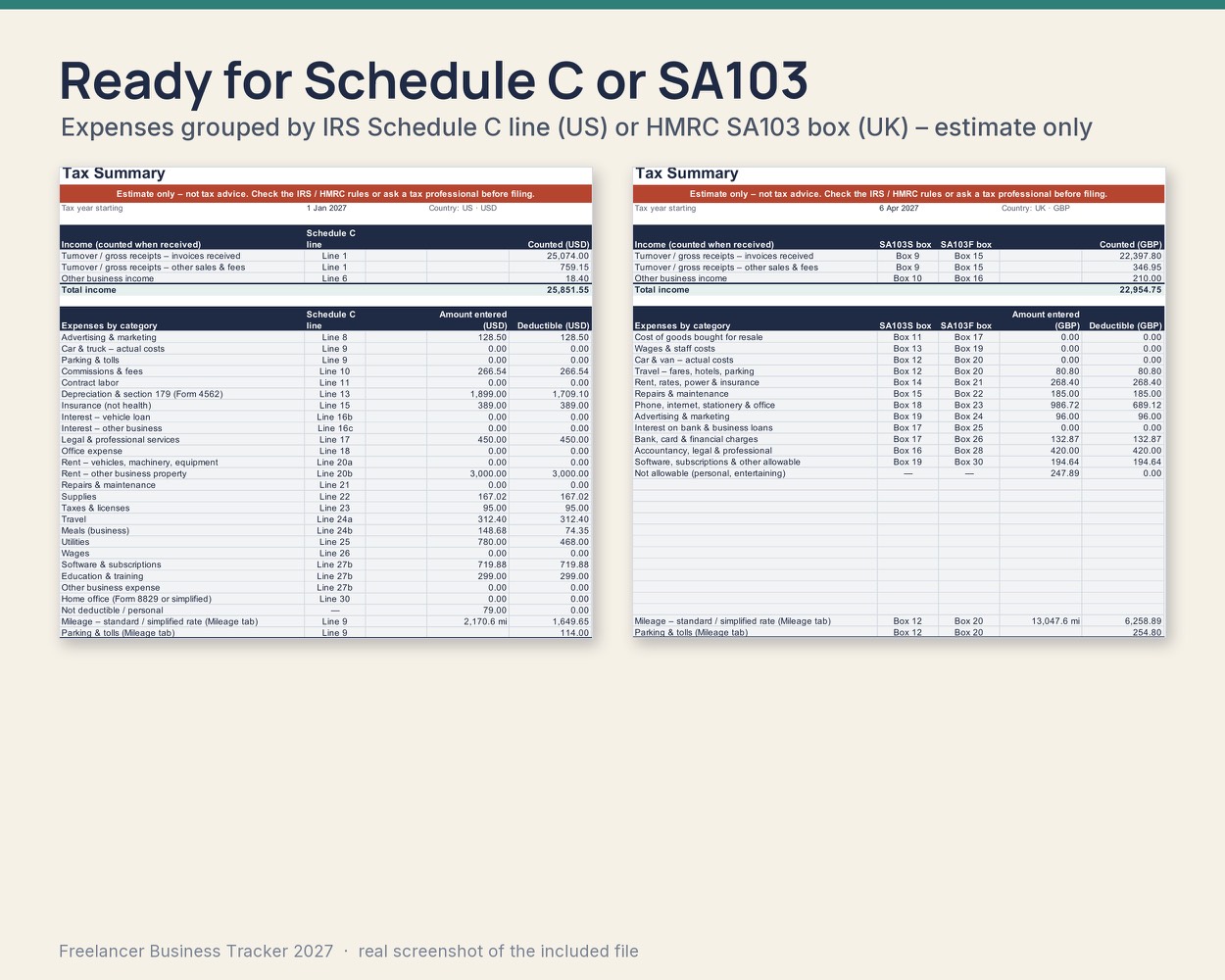
On your Self Assessment, self-employment expenses go into boxes on the SA103 pages – the short version (SA103S) or the full one (SA103F). The Freelancer Business Tracker groups every expense by both, so you can copy the totals at the end of the tax year.
| Category in the workbook | SA103S (short) | SA103F (full) |
|---|---|---|
| Cost of goods bought for resale | Box 11 | Box 17 |
| Wages & staff costs | Box 13 | Box 19 |
| Car & van – actual costs | Box 12 | Box 20 |
| Travel – fares, hotels, parking | Box 12 | Box 20 |
| Rent, rates, power & insurance | Box 14 | Box 21 |
| Repairs & maintenance | Box 15 | Box 22 |
| Phone, internet, stationery & office | Box 18 | Box 23 |
| Advertising & marketing | Box 19 | Box 24 |
| Interest on bank & business loans | Box 17 | Box 25 |
| Bank, card & financial charges | Box 17 | Box 26 |
| Accountancy, legal & professional | Box 16 | Box 28 |
| Software, subscriptions & other allowable | Box 19 | Box 30 |
| Not allowable (personal, entertaining) | — | — |
Things UK users ask
- Tax year from 6 April. The UK file starts on 6 Apr 2027. Change one cell on Settings to use it for 2026–27.
- Mileage. Simplified mileage at HMRC rates (55p for the first 10,000 business miles, then 25p; motorcycles 24p for 2026–27) – or actual car costs, not both.
- Not Making Tax Digital software. It does not send anything to HMRC. If you must use MTD for Income Tax, you need recognised software; this spreadsheet is for your own records and planning.
- Cash basis. Income counts on the date you were paid.
Questions
Short or full SA103?
The workbook shows totals for both. Use the boxes for the form you file.
Does it work out my Class 4 National Insurance?
It shows a rough set-aside estimate to help you plan. It is not a tax calculation.
Is it MTD compatible?
No. It does not connect to HMRC.
Freelancer Business Tracker 2027 – $12 one-time
Excel workbook for US (Schedule C) and UK (SA103) self-employed people: invoices, time log, expenses, mileage, monthly totals and a tax set-aside estimate. Built and tested in desktop Excel (Windows and Mac).
Not tax advice. This page and the spreadsheet help you keep records and plan. They do not calculate your tax bill. Check the IRS or HMRC rules, or ask a tax professional.